Populating LDAP Server
Populating our DIT
After populating our DIT with a Tree and Users it looks like this
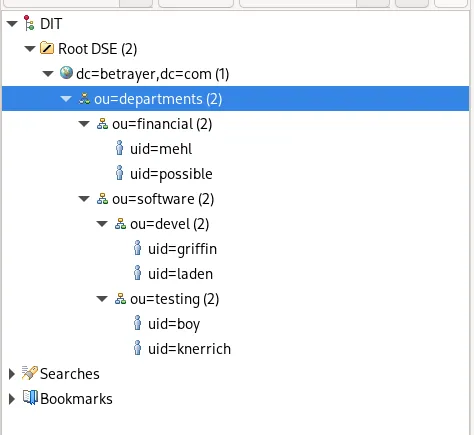
The Export LDIF dump for this looks like this:
version: 1

dn: dc=betrayer,dc=com
objectClass: dcObject
objectClass: organization
objectClass: top
dc: betrayer
o: MaxUndBenni

dn: ou=departments,dc=betrayer,dc=com
objectClass: organizationalUnit
objectClass: top
ou: departments

dn: ou=software,ou=departments,dc=betrayer,dc=com
objectClass: organizationalUnit
objectClass: top
ou: software

dn: ou=financial,ou=departments,dc=betrayer,dc=com
objectClass: organizationalUnit
objectClass: top
ou: financial

dn: ou=devel,ou=software,ou=departments,dc=betrayer,dc=com
objectClass: organizationalUnit
objectClass: top
ou: devel

dn: ou=testing,ou=software,ou=departments,dc=betrayer,dc=com
objectClass: organizationalUnit
objectClass: top
ou: testing

dn: uid=griffin,ou=devel,ou=software,ou=departments,dc=betrayer,dc=com
objectClass: inetOrgPerson
objectClass: organizationalPerson
objectClass: person
objectClass: top
cn: Peter Griffin
sn: Griffin
givenName: Peter
mail: griffin@betrayer.com
uid: griffin
userPassword:: e3NtZDV9YVhKL2JlVkF2TDRENk9pMFRLcDhjM3ovYTZQZzBXeHA=

dn: uid=laden,ou=devel,ou=software,ou=departments,dc=betrayer,dc=com
objectClass: inetOrgPerson
objectClass: organizationalPerson
objectClass: person
objectClass: top
cn: Felix Laden
sn: Laden
givenName: Felix
mail: laden@betrayer.com
uid: laden
userPassword:: e3NtZDV9YVhKL2JlVkF2TDRENk9pMFRLcDhjM3ovYTZQZzBXeHA=

dn: uid=mehl,ou=financial,ou=departments,dc=betrayer,dc=com
objectClass: inetOrgPerson
objectClass: organizationalPerson
objectClass: person
objectClass: top
cn: Benjamin Mehl
sn: Mehl
givenName: Benjamin
mail: mehl@betrayer.com
uid: mehl
userPassword:: e01ENX1DWTlyelVZaDAzUEszazZESmllMDlnPT0=

dn: uid=possible,ou=financial,ou=departments,dc=betrayer,dc=com
objectClass: inetOrgPerson
objectClass: organizationalPerson
objectClass: person
objectClass: top
cn: Kim Possible
sn: Possible
givenName: Kim
mail: possible@betrayer.com
uid: possible
userPassword:: e3NtZDV9YVhKL2JlVkF2TDRENk9pMFRLcDhjM3ovYTZQZzBXeHA=

dn: uid=knerrich,ou=testing,ou=software,ou=departments,dc=betrayer,dc=com
objectClass: inetOrgPerson
objectClass: organizationalPerson
objectClass: person
objectClass: top
cn: Max Knerrich
sn: Knerrich
givenName: Max
mail: knerrich@betrayer.com
uid: knerrich
userPassword:: e3NtZDV9YVhKL2JlVkF2TDRENk9pMFRLcDhjM3ovYTZQZzBXeHA=

dn: uid=boy,ou=testing,ou=software,ou=departments,dc=betrayer,dc=com
objectClass: inetOrgPerson
objectClass: organizationalPerson
objectClass: person
objectClass: top
cn: Money Boy
sn: Boy
givenName: Money
mail: boy@betrayer.com
uid: boy
userPassword:: e3NtZDV9YVhKL2JlVkF2TDRENk9pMFRLcDhjM3ovYTZQZzBXeHA=
Connect to User
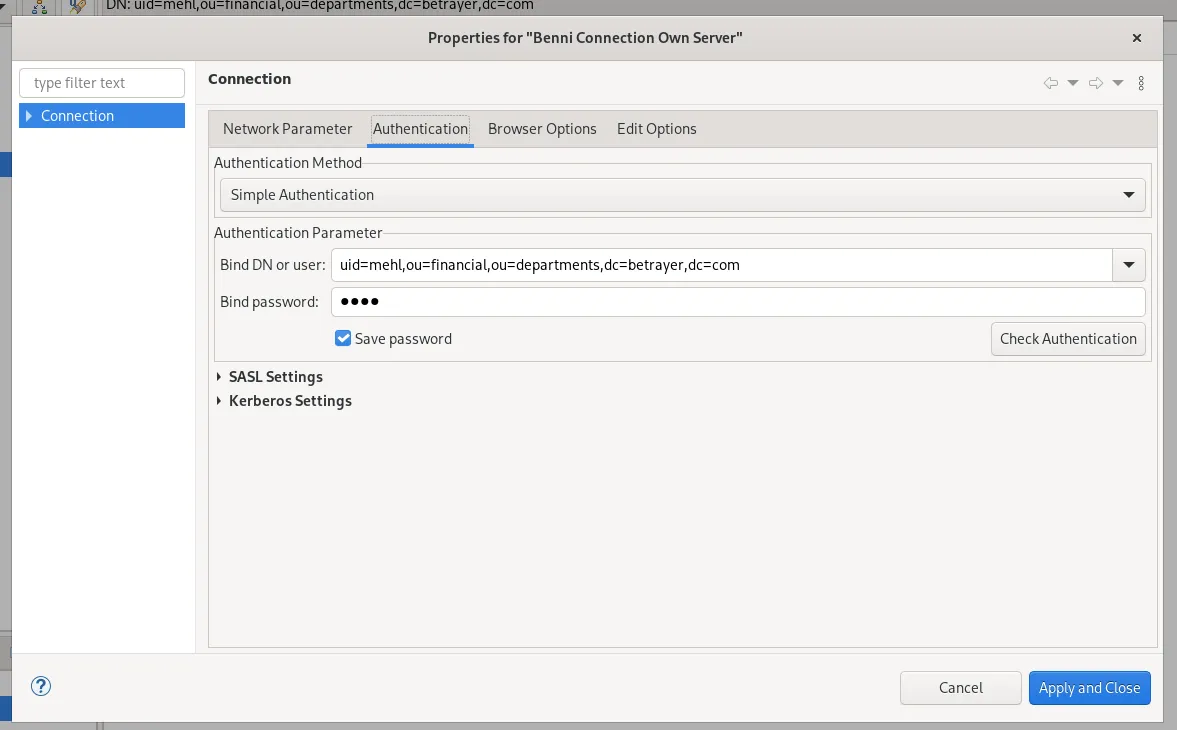
Then we can simply connect to a user that has been populated. In this Case i will login as the user with uid=mehl.
The Password for this user is test.
Extending exisiting User
For extending an Entry you need to switch back to your admin connection.
To extend an exisiting Entry or in this case an existing User you need to select an Entry and right click on a existing objectClass. Then you need to select New Value.
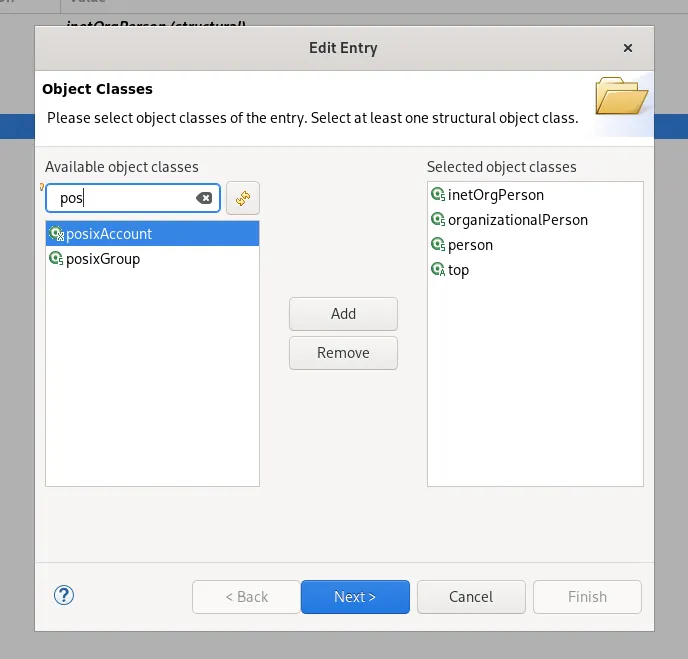
In our Case we are extending our Entry with posixAccount.
After you added the objectClass you need to fill in gidNumber, homeDirectory and uidNumber.